

電話帳ナビ-迷惑電話ブロックの最強版で電話セキュリティを強化
by RiBrison inc.
Phonebook Navi provides the best peace of mind on your smartphone. Instantly judge nuisance calls from the aggregated results of more than 5 billion cases and block them strongly. The app solves your phone anxiety.

電話帳ナビ-迷惑電話ブロックの最強版で電話セキュリティを強化
(See bottom for details)It wasPhonebook Navi is a specialist who specializes in phone number analysis for about 13 years from 2008 and has identified more than 5 billion phone numbers in Japan and overseas at present.Only Phonebook Navi can identify phone numbers with an overwhelming amount of information and the latest analysis technology.Get peace of mind and safety with the phonebook navigation, which has the largest number of users in the nuisance call prevention app.It wasSince the phone number of the courier and the recruiter is also registered, it is easy to identify the call that "should be answered".The app is easy to use, just tap the icon after installation to launch it.When an incoming call arrives, the phone number is automatically searched and displayed on the screen together with the annoyance level.It wasSince the phonebook navigation is used by many users, it is also effective as a business card function on the caller side.Since it is possible to convey information to the recipient side about the company name and what the company is doing before responding, it will be easier for the other party to feel a sense of security.For details, see Enterprise Services (Caller Function) from the app menu.It wasIt was======================Request from phonebook navigation――――――――――――――――――――――Even if you post a bug in the app on the Google Play review, it is difficult to solve the problem because the details cannot be grasped.It wasIf you run into [email protected] describe the problem status and send it to us.
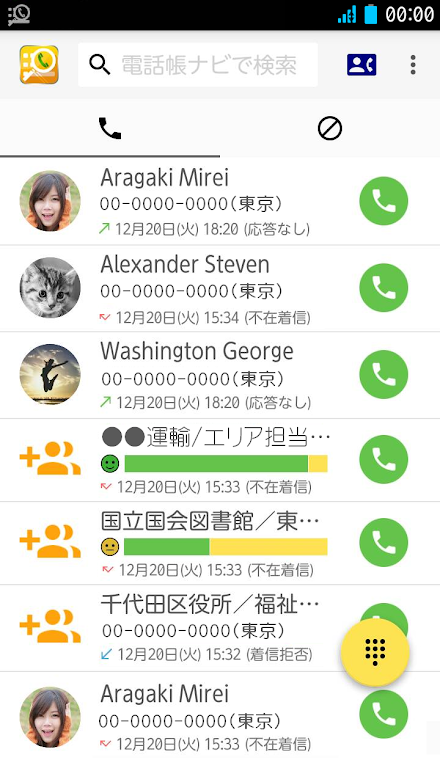
We also accept requests.We will do our best to accommodate you.It wasWe apologize for the inconvenience, but thank you for your cooperation.======================It wasIt wasIncoming calls received from landlines can also be forwarded to mobile phones to identify the source.* Please transfer to the mobile phone with Phonebook Navi installed.If you handle incoming landline calls in this way, you can block fraudulent and nuisance calls.Phonebook Navi provides a function to display the other party and identify nuisance calls for free.Since it is a strong security measure for elderly households, we strongly recommend setting the transfer of landlines.It was[Main functions of phonebook navigation]・ Detection and blocking of nuisance calls (identify the other party from the incoming number Caller ID)・ Recording and display of call history and registration of rejection (identify the other party from the past incoming call history)・ As a business card function on the caller sideIt wasIt was■ Strongly block nuisance calls with the automatic call rejection functionEquipped with high-precision AI to guess the content of the call.
It automatically detects fraudulent crimes, solicitations, and sales calls and rejects incoming calls.・ The automatic call rejection function (rejection by AI) can be used by purchasing with in-app purchase (monthly charge of 100 yen).・ You can use the simple call rejection function (reject by nuisance call) free of charge.It was■ Phonebook Navi displays the "nuisance call degree" aggregated from the users who are using the app.The graph allows you to intuitively determine whether the call is rejected by a nuisance call or the call needs to be answered.It was■ Displays word-of-mouth information posted by other users as word-of-mouth information when receiving a call.* For example, when a courier company contacts you to confirm that you are at home, normally the courier drivers mobile phone is not registered on the terminal, so only the phone number is displayed.If you have the phonebook navigation installed, it will be displayed as "OO home delivery driver", so you can answer the call with confidence.* About 90% or more of Japanese courier companies are registered.It was■ Phone numbers that you do not want to answer, such as fraudulent calls and nuisance calls, may also be registered by providing information from the user.This information is very effective as information to prevent being involved in crime.By installing the phonebook navigation in advance, it will be effective as a crime prevention measure.Appointment phone, oleore fraud, transfer fraud, special fraud, fictitious billing, etc.
are registered.It was■ It is possible to automatically display the other partys information even when making a call (it can also be turned off on the setting screen).It can be used to make a wrong call to another party by mistake, or to confirm the other party when calling an unknown number.It wasIt was=======================Upgrade more conveniently with paid options=======================● In the paid version, AI automatically identifies nuisance calls and rejects incoming calls.* The free version will inform you of the danger, but it cannot be refused automatically.● The maximum number of incoming calls is unlimited (you can look back in the past)* The free version has a history limit of 30.● Cancellation of advertisement display in the app● Cancellation of the judgment screen after the call ends● Check more detailed information on the details screenIt wasReasons to recommend paid options >>>The judgment accuracy of nuisance calls is also high, and many functions can be used.It is especially recommended for elderly people as it automatically blocks fraudulent and solicited calls.=========================It wasIt was[Purpose of using the permission of the phone book navigation]The phonebook navigation app uses the following permissions to realize the functions described.It wasandroid.permission.CALL_PHONEMaking a phone callI am using it because it is necessary for the call function.It wasandroid.permission.PROCESS_OUTGOING_CALLSChange, monitor, or cancel phone callsIt is used to make a call from the incoming call history and outgoing call history screens.It wasandroid.permission.READ_CALL_LOGReading call historyIt is used to display incoming call history and outgoing call history in the app.It wasandroid.permission.WRITE_CALL_LOGWriting call historyIt is used for the function to delete the incoming / outgoing call history.It wasandroid.permission.READ_CONTACTSAcquisition of phone book dataIn case of incoming call from the phone number registered in the phonebook of the terminal, it can be hidden by setting the option, but the phonebook data is used to collate it.It wasandroid.permission.WRITE_CONTACTSWriting phone book informationIt is used for the function to delete the incoming / outgoing call history.
(At the time of OS before Android 4 series)It wasandroid.permission.RECEIVE_BOOT_COMPLETEDIt will start automatically at startup.It is used for the operation that the application starts automatically when the terminal is restarted.It wasandroid.permission.SYSTEM_ALERT_WINDOWDisplay of warning screenIt is used to pop up information on the screen when an incoming call arrives.It wasandroid.permission.WRITE_EXTERNAL_STORAGEandroid.permission.READ_EXTERNAL_STORAGEAccess to image, video, and audio files on the terminalThe data registered in the incoming call rejection list is saved in the external storage and used to restore it on another model (when changing models, etc.)The purpose is to use the storage in the terminal, and it does not access other files.It wasWe do not use permissions for purposes other than the above.Telnavi Engineer TEAMIt wasIt was* Rakuten Link does not work because it is not an incoming call on the telephone line.
Rakuten Link must be closed.
Rakuten Link is a data communication call.* If installed on a Huawei terminal, it may not work properly.* DUAL SIM compatible models may not work depending on the terminal settings.
In most cases, it has been confirmed that it works depending on the settings of the terminal, but the settings will differ depending on the terminal or the SIM you are using.* Although it supports incoming calls from IP phones, pop-up information cannot be displayed for calls that are answered by the IP phone application.* Some security software may display "Access to contacts" as a risk, but it is used to determine when an incoming call is received from a number registered in the terminal phonebook.Please purchase the paid version after confirming that it works with the free version.
[No refunds after purchase]安定性の改善。- セキュリティアップデート後にクラッシュが発生する問題の修正- Android 4.1 から 4.4 でクラッシュが発生する問題の修正
About 電話帳ナビ-迷惑電話ブロックの最強版で電話セキュリティを強化
- Package name (App ID)
- jp.telnavi.app.phone
- Available on
- Google Play
- Price
- Free
- Version
- v5.10.3
- Updated
- April 25, 2022
- Developer
- RiBrison inc.
Looking for the 電話帳ナビ-迷惑電話ブロックの最強版で電話セキュリティを強化 APK?
The safest way to get 電話帳ナビ-迷惑電話ブロックの最強版で電話セキュリティを強化 (jp.telnavi.app.phone) on your Android device is to install it directly from Google Play — you'll always get the latest official version, automatic updates, and no risk of modified or infected APK files from third-party sites.

Music Features
Enjoy high-quality music streaming and playback features.
Gaming Features
Enjoy immersive gaming experience with various game modes.
Camera Features
Advanced camera features with editing capabilities.
See 電話帳ナビ-迷惑電話ブロックの最強版で電話セキュリティを強化 in Action


What Our Users Say
Don't just take our word for it. Here's what our users have to say about this Android app.
"最近権限の取得理由を表示するようになったようだが、依然として使用しない機能の権限についても起動時にまとめて取得しようとし、許可しないと使用できないのは変わっていない。"
"有料版を使用しているが、Xiaomi Redmi Note 9Sになって着信時に表示がされなくなった。"
"電話に出る前に不要な電話かどうかわかるので非常に便利です。口コミ登録のない電話番号からかかってきたときは必ず情報提供したいと思います。 サブアドレス付きの電話番号から着信したときに、電話番号部分のみで判定出来るようになっていると更に良いと思います。"
"Very useful"
"Good to use. You can recognise the sender before you take a phone call."
"電話がかかるとすぐに相手先がわかるので、知らない電話番号でも安心して出られます。 着信履歴から電話帳へ登録できるのも便利です!"
"電話帳に入れてない相手でも、電話がかかったときにわかるからとても便利! セールスとかの電話には出なくて済みます。"
"I like it."
"便利です。電話の相手がわかって安心して出られています。"
"めちゃくちゃ便利です!"
Frequently Asked Questions
Is 電話帳ナビ-迷惑電話ブロックの最強版で電話セキュリティを強化 free?
Yes, 電話帳ナビ-迷惑電話ブロックの最強版で電話セキュリティを強化 is free to download and install on Android through Google Play.
How do I install 電話帳ナビ-迷惑電話ブロックの最強版で電話セキュリティを強化 on Android?
Open Google Play on your Android phone or tablet, search for 電話帳ナビ-迷惑電話ブロックの最強版で電話セキュリティを強化 by RiBrison inc. or tap the Google Play button on this page, then tap Install. The app downloads and installs automatically.
What is jp.telnavi.app.phone?
jp.telnavi.app.phone is the App ID (package name) of 電話帳ナビ-迷惑電話ブロックの最強版で電話セキュリティを強化 on Google Play. Every Android app has a unique package name, and it is the safest way to verify you are installing the official app.
Is 電話帳ナビ-迷惑電話ブロックの最強版で電話セキュリティを強化 safe to download?
Installing 電話帳ナビ-迷惑電話ブロックの最強版で電話セキュリティを強化 from Google Play is the safest option: you get the official version published by RiBrison inc., verified by Google Play Protect, with automatic updates. Avoid APK files from unofficial third-party sites.
Get 電話帳ナビ-迷惑電話ブロックの最強版で電話セキュリティを強化 Today
電話帳ナビ-迷惑電話ブロックの最強版で電話セキュリティを強化 for Android — free download on Google Play.
Compatible with Android phones and tablets — available on Google Play.
Ask AI about this app
Get instant answers about features, tips and more from popular AI assistants.